
A storm hits on Friday night. By Monday morning, the desk is full of roof claims, water intrusion claims, fallen limb losses, and policyholders who want an answer now, not next week.
That’s the environment where virtual home inspections stopped being a novelty and became an operating tool. When field capacity is tight, travel is slow, and the claim volume spikes all at once, carriers need a way to move the file forward without waiting for every inspection to happen in person.
Used well, virtual inspections help sort the simple from the serious. They help document conditions early, guide mitigation, and keep low-risk files from clogging up the same queue as dangerous or technically complex losses. Used poorly, they create false confidence, weak photo sets, and missed damage on the very properties that need the most scrutiny.
The key question isn’t whether virtual inspections belong in claims. They do. The question is where they fit, where they don’t, and how to combine them with on-site expertise so speed doesn’t come at the cost of accuracy.
The Modern Claims Challenge and The Virtual Solution
The problem usually starts with volume, not technology.
A carrier gets hit with a surge after wind, hail, or a regional weather event. Desk adjusters can review files quickly, but they can’t teleport to roofs, attics, crawlspaces, and fenced backyards. Field resources get stretched. Scheduling slips. Homeowners wait. Temporary repairs happen before anyone has a clean record of the original condition.
Virtual inspection workflows earn their place by giving the adjuster an immediate way to start the file, collect evidence, and decide whether the property belongs in a fast remote path or needs boots on the ground.
What the desk needs most
In a heavy claim cycle, the first operational win is triage.
A guided remote session can confirm occupancy, visible damage, mitigation status, and obvious safety issues. It can also tell you very quickly when the loss is not a virtual-only job. A missing slope, a tall multi-story elevation, a steep roof, a detached structure with impact damage, or signs of interior moisture that need closer tracing all change the assignment.
Practical rule: Use virtual inspections first to classify the claim, not to force every claim into a remote process.
That distinction matters. The best programs don’t treat virtual home inspections as a replacement for judgment. They treat them as a faster front end to better decisions.
Why policyholders usually accept the process
Many claims professionals still assume homeowners resist remote inspection. In practice, they often don’t.
A 2025 Valligent survey of over 1,400 users who completed virtual home inspections found 97% reported overall satisfaction, while 98% praised clear communication and 98% said the process was easy to complete. That lines up with what claims teams see on the ground. If the instructions are clear and the scope is appropriate, people like convenience and speed.
For carriers, that matters as much as the technical workflow. A homeowner who can complete a guided session from a phone is often more cooperative, faster to schedule, and less frustrated than one waiting days for an appointment window.
Virtual inspections don’t solve catastrophe response by themselves. They do solve one piece of it. They create movement when the file would otherwise sit still.
Defining The Virtual Home Inspection
A virtual home inspection is a remote property assessment completed through live video, app-guided photo capture, or both. The important detail is that “virtual” covers more than one model, and those models are not equally reliable.
Two versions that get confused
The first model is DIY remote capture.
The homeowner follows prompts in an app, takes required photos, and uploads them for later review. This works best for straightforward underwriting renewals, basic exterior condition documentation, and low-complexity interiors where the needed evidence is obvious and easy to photograph.
The second model is professionally guided remote inspection.
In that setup, a trained inspector or adjuster directs the person on site in real time. The facilitator might be the homeowner, a contractor, a tenant, or another field contact. The remote expert controls the sequence, asks for retakes, changes angles, requests wider context shots, and verifies that the image set answers the claim question.
Those are very different workflows. One is prompt-driven collection. The other is live technical direction.
What it is and what it isn’t
A virtual inspection is not magic, and it isn’t a shortcut around physics.
It does not let a desk adjuster feel soft decking, test every suspect building component, or safely inspect a dangerous roof from a living room chair. What it does well is capture visible conditions, document the property early, and support decisions about scope, escalation, and mitigation.
Its role has grown quickly. Insurance Journal reported that as of 2025, an estimated 60% of all insurance-required home inspections in the U.S. are conducted remotely. In analysis of 65,000 such inspections, properties were underinsured by an average of $245,000, generating nearly $600 in additional premium per policy.
That matters to carriers for a simple reason. Better remote documentation doesn’t just move claims. It also improves underwriting visibility.
Why carriers care
The business case goes beyond convenience.
- Faster intake: Remote assignments can often be launched before a field slot opens.
- Wider reach: Rural or travel-heavy locations become easier to review.
- Better segmentation: Carriers can reserve field experts for files that need them.
- Stronger pricing inputs: Remote inspections surface condition issues that may otherwise stay undocumented.
One practical difference between average and effective programs is the hardware used on site. A shaky phone feed wastes time. Something as simple as a stabilizer can improve usable footage during guided sessions, especially when the facilitator is walking the exterior or trying to hold a steady view overhead. Tools in the field often matter more than software claims on a sales page, which is why setups like this phone gimbal stabilizer used for mobile capture are relevant in real inspection work.
Virtual home inspections are best understood as a category. The value depends on who’s guiding them, what evidence is required, and whether the property is suitable for remote review in the first place.
The Virtual Inspection Workflow and Technology
A strong remote inspection follows a sequence. A weak one is just a video call with random screenshots.
The difference shows up in claim quality, not just convenience.
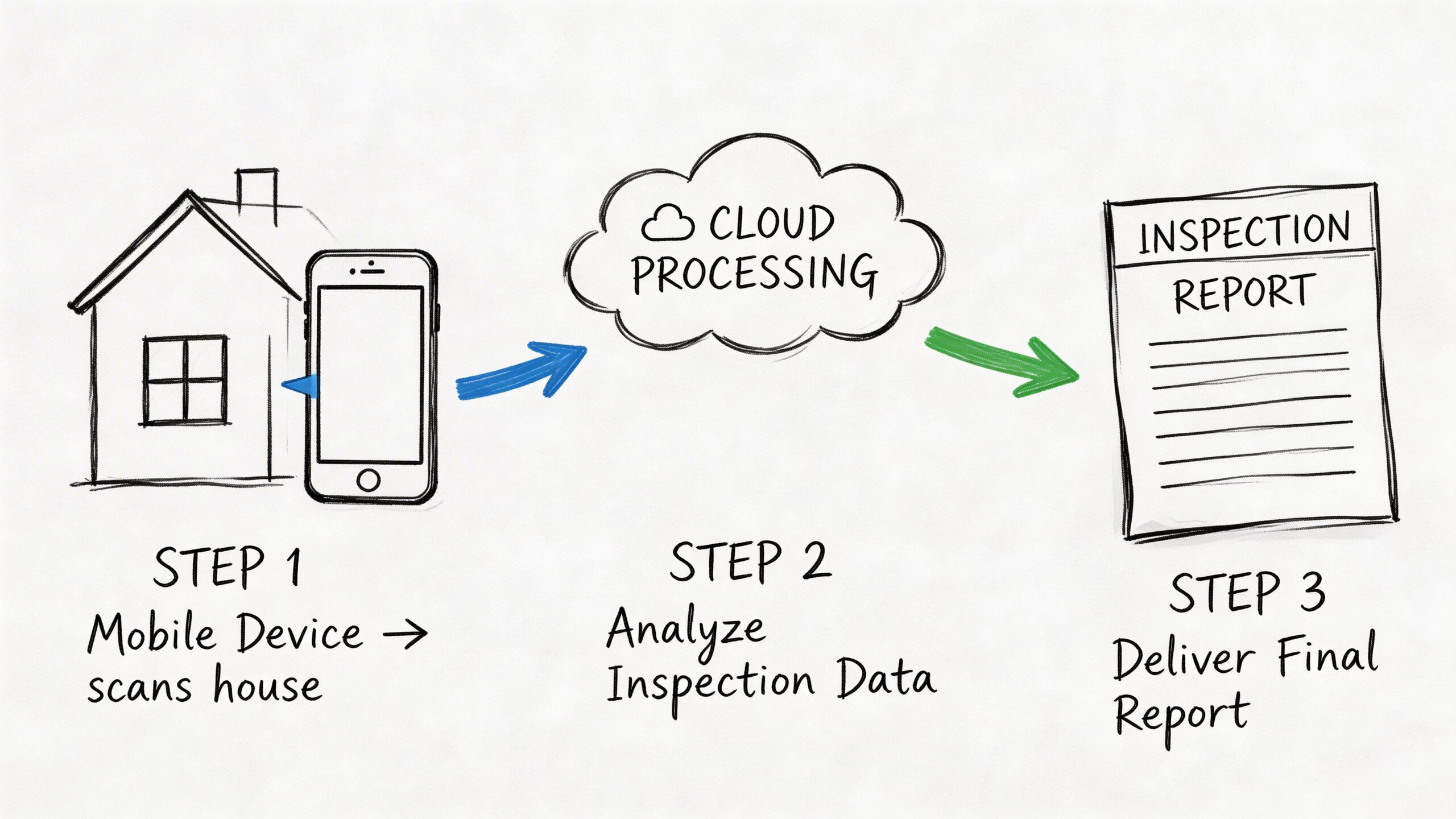
Step one starts before the call
The inspection begins when the assignment is scoped correctly.
Before anyone opens FaceTime, Zoom, or a specialized inspection app, the carrier or TPA needs to define the purpose of the visit. Is the goal first notice documentation, underwriting review, mitigation confirmation, or a targeted reinspection? If the assignment doesn’t have a defined question, the remote session usually collects too much of the wrong material and not enough of the right material.
At minimum, the site contact should know:
- What device to use: A current smartphone or tablet with a functioning camera
- Where to be: On site, with access to all requested areas
- What to prepare: Good lighting, clear paths, and any locked spaces opened in advance
- What not to do: Guess at damage, narrate conclusions, or skip difficult areas
What happens during the live session
The remote inspector should control the pace.
Start outside. Confirm the address at street level. Get broad elevation views. Establish the approach to the front, sides, rear, detached structures, fences, and visible grade conditions. Only after those context shots are secure should the session move into close-ups and components.
For exterior roof-related claims, the remote inspector may direct the facilitator to show specific details such as roof planes, valleys, underlayment over drip edge, chimney saddles or crickets, pipe and vent flashing, and roof-to-wall junctions. According to the Los Angeles County Remote Video Inspection guide, virtual inspections can reduce inspection cycle times by up to 70% when real-time video and tamper-proof image technology are used to assess property components remotely.
That cycle-time gain only happens if the evidence is structured. Wandering around the property with a phone doesn’t count as a workflow.
The camera should answer a question every time it moves.
Inside the home, the sequence should stay just as disciplined. Enter each room with a wide establishing view, then move to the ceiling, walls, floor transitions, windows, and any reported damage points. Mechanical areas need their own pass. If there’s a utility room, panel, HVAC equipment, or visible plumbing concerns, those should be captured separately, not as a rushed add-on.
Why verification tech matters
Photo quality is only half the issue. Authenticity matters too.
Modern virtual inspection platforms can attach metadata such as timestamp, geolocation, and device information. Some systems also apply anti-tamper controls that help confirm the image was captured in real time and not edited later. For claims handling, that matters when the file may be disputed, supplemented, or reviewed months after the original inspection.
Such process discipline protects everyone involved. A geo-tagged, time-sequenced image set with a clean chain of capture is far more defensible than a folder of unlabeled photos emailed after the fact.
To understand how a guided remote session is usually presented to a homeowner or field contact, this walkthrough is a useful visual reference:
What a usable deliverable looks like
A finished virtual inspection report should be easy for the next handler to use.
That usually means:
| Report element | Why it matters |
|---|---|
| Property overview images | Establishes context and confirms location |
| Labeled component photos | Lets reviewers understand exactly what they’re seeing |
| Notes tied to images | Prevents ambiguity during estimate review |
| Escalation recommendation | Flags whether a field inspection is still needed |
| Verified timestamps or metadata | Strengthens file defensibility |
The remote session is successful when the desk adjuster can make a decision from the report. If the report still leaves basic questions unanswered, the problem usually wasn’t the technology. It was the workflow.
Virtual Inspections Versus In-Person Assessments
The debate is often framed too narrowly.
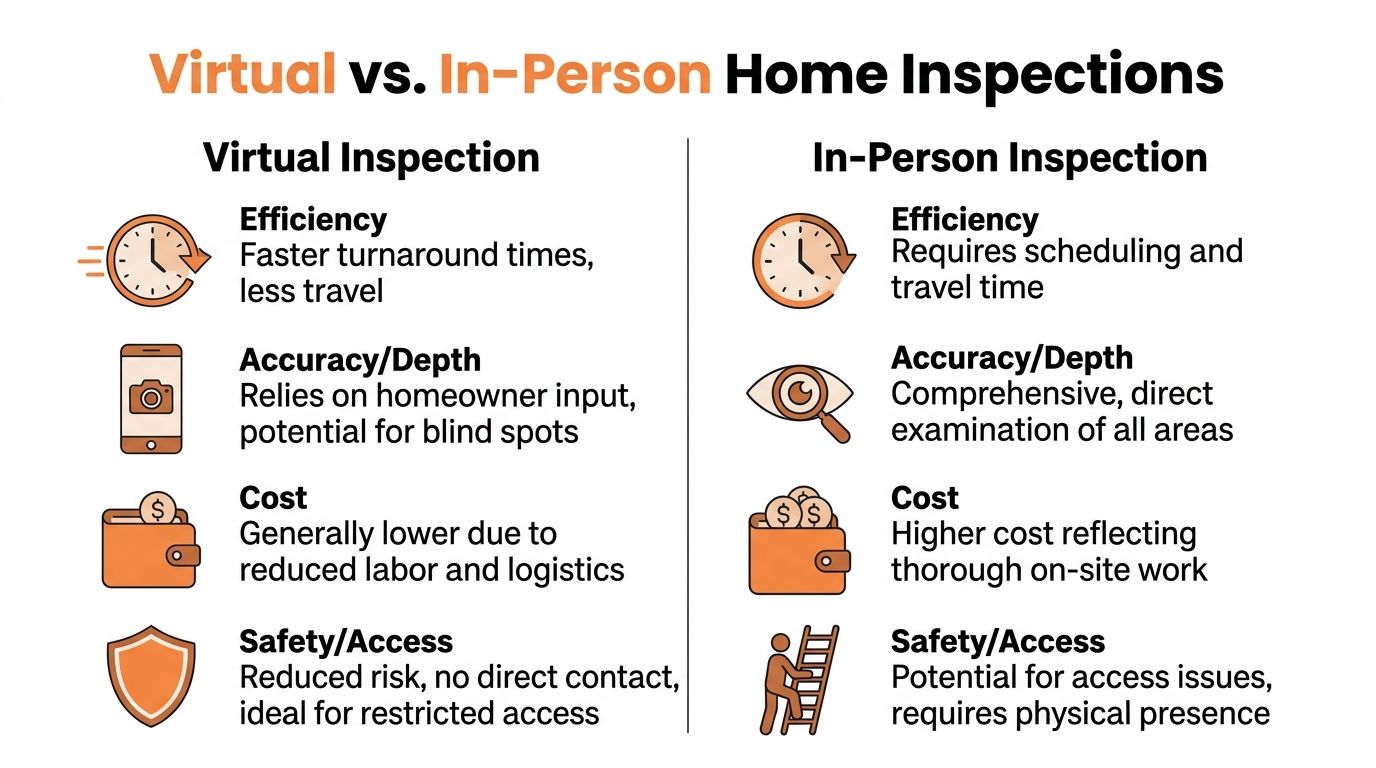
Virtual is not “better” than in-person. In-person is not “outdated.” They solve different problems, and the claims professional who understands that will make cleaner file decisions than the one chasing a single-method workflow.
Comparison of inspection methods
Here’s the practical side-by-side view.
| Criterion | Virtual Inspection | In-Person Inspection |
|---|---|---|
| Speed | Faster to launch and complete when access is straightforward | Slower because scheduling and travel are required |
| Safety | Keeps adjusters off hazardous surfaces | Better direct access, but greater field exposure |
| Travel burden | Minimal | Significant for dispersed territories |
| Evidence depth | Strong for visible, guided documentation | Strongest for direct observation and hard-to-see conditions |
| Suitability for interiors | Very good when lighting and access are good | Very good |
| Suitability for steep roofs | Limited without a field specialist | Better for close inspection and physical verification |
| Quality control | Depends heavily on process and facilitator cooperation | Depends more on inspector skill and reporting discipline |
| Geographic reach | Excellent for broad regional coverage | Constrained by local field capacity |
Where virtual wins cleanly
Virtual inspections are strongest when the key question is visible and the environment is manageable.
Examples include occupied homes with minor interior water staining, routine exterior condition reviews, simple follow-up documentation, or first-pass triage after a storm. They also work well when the carrier needs immediate file movement and the loss can be segmented before a more expensive field deployment.
The safety benefit is real. A desk adjuster doesn’t need to climb anything, and neither does a homeowner when the scope is limited to accessible areas. For some carriers, remote review also reduces the need to send personnel into locations where access is delayed, restricted, or inefficient.
A stable exterior camera can also supplement the broader inspection record when a property has ongoing exposure or repeated weather impacts. This kind of outdoor security camera setup for property monitoring isn’t an inspection substitute, but it illustrates how fixed visual documentation can support condition awareness between loss events.
Where in-person still leads
Some damage doesn’t photograph well.
Subtle creasing, soft decking, brittle material response, complex flashing failures, and slope-specific storm effects often require proximity, angle control, and trained judgment that a remote facilitator can’t reliably reproduce. The same is true for tall elevations, intricate roof geometry, and structures with unsafe access points.
That’s before you get to human behavior. Homeowners may unintentionally skip critical views. Contractors may focus on evidence that supports their own scope. Tenants may have limited access or little knowledge of the building envelope. Even a cooperative on-site contact can struggle to hold a phone correctly while following technical instructions.
A clean remote file depends on two people doing their jobs well. The remote expert and the person holding the camera.
The decision should follow the claim, not the trend
The right method depends on what the claim needs.
Use virtual first when the file benefits from speed, early documentation, and broad segmentation. Use in-person first when the loss involves hazardous access, technically disputed damage, or conditions that can’t be assessed from visible imagery alone.
A practical decision framework looks like this:
- Choose virtual first when access is easy, the goal is triage, and the evidence required is mostly visual.
- Choose in-person first when the structure is steep, tall, unsafe, disputed, or mechanically complex.
- Choose both when a remote expert can guide scope while a field professional captures the hazardous or highly technical details.
That third option is usually where the best claim outcomes happen. It avoids the delay of treating every file as fully field-driven, and it avoids the risk of pretending every property can be inspected well through a phone camera.
Key Benefits for Insurers and Homeowners
Virtual home inspections create value on both sides of the claim. The benefits are different, but they connect.
For the carrier, the gain is operational control. For the homeowner, the gain is less waiting and less confusion.
Why insurers keep expanding remote programs
Carriers adopt remote inspection workflows because they help the organization move more files with better assignment discipline.
A virtual path gives desk teams a way to separate straightforward claims from those that need a specialist. That improves field utilization. Instead of sending every loss to a roof inspector, carriers can reserve scarce field resources for dangerous elevations, coverage disputes, structural complexity, and losses where direct observation matters most.
There’s also a consistency advantage. A guided workflow can require the same sequence of views, the same component labels, and the same report structure across a wide territory. That kind of repeatability helps quality review, estimate review, and reinspections.
Other insurer-side benefits are practical:
- Safer claim handling: Fewer unnecessary climbs and fewer avoidable site visits
- Better staffing flexibility: Desk teams can review more geography without matching travel time
- Earlier mitigation decisions: The file gets enough evidence sooner to authorize next steps
- Cleaner documentation: Standardized image capture improves handoff between claim handlers
For adjusters working long days during weather events, communication tools matter as much as inspection tools. Something as basic as a noise-canceling Bluetooth headset for hands-free calling can make guided sessions and policyholder conversations more usable in the field or at a crowded claims desk.
What homeowners care about
Policyholders usually don’t care about inspection philosophy. They care about friction.
They want to know when someone is going to look at the damage, what they need to do, whether the process is legitimate, and how quickly the claim can move. A good virtual process answers all four.
For homeowners, the practical upsides are easy to understand:
- Less scheduling hassle: They can complete the process without waiting for a long appointment window
- Faster file movement: Early documentation helps the claim progress sooner
- More visibility: Guided sessions show them exactly what’s being reviewed
- Less disruption: No need to rearrange a full day around an on-site visit for every claim
The benefit that matters most
The biggest advantage is not just speed. It’s speed with direction.
A remote inspection done well gives the policyholder a clear next step. Maybe the claim can continue virtually. Maybe a field expert needs to inspect the roof. Maybe mitigation should happen immediately. That clarity lowers frustration because the homeowner isn’t stuck waiting with no movement.
Good virtual inspections don’t just collect images. They reduce uncertainty.
That’s why these programs work best when they’re built around claim handling, not just technology adoption. The point isn’t to digitize everything. The point is to get the right eyes on the right problem at the right time.
Knowing The Limits and Using a Hybrid Model
Much marketing around virtual inspections falls apart at this point.
Remote review is useful. It is not universal. The properties that create the biggest claim exposure are often the ones least suited to a virtual-only approach.
Where virtual-only breaks down
Steep roofs are the clearest example.
A phone camera aimed upward from the ground can miss impact detail, crease patterns, flashing separation, edge condition, and subtle storm effects that only become obvious from the correct angle and distance. Tall structures create the same problem. So do multi-slope roof systems, restricted access, tree impacts, and losses where the visible exterior symptoms don’t fully explain the interior damage.
The reliability issue is not theoretical. A Truepic discussion of virtual home inspection limitations notes that in-person inspections can reduce error rates by 30% to 50% for steep or tall roofs, which is why a hybrid model with field experts capturing data for remote adjusters is essential in high-risk situations.
That matches everyday field reality. If the property is dangerous or the damage is nuanced, remote-only review turns from efficient to fragile very quickly.
What the hybrid model is
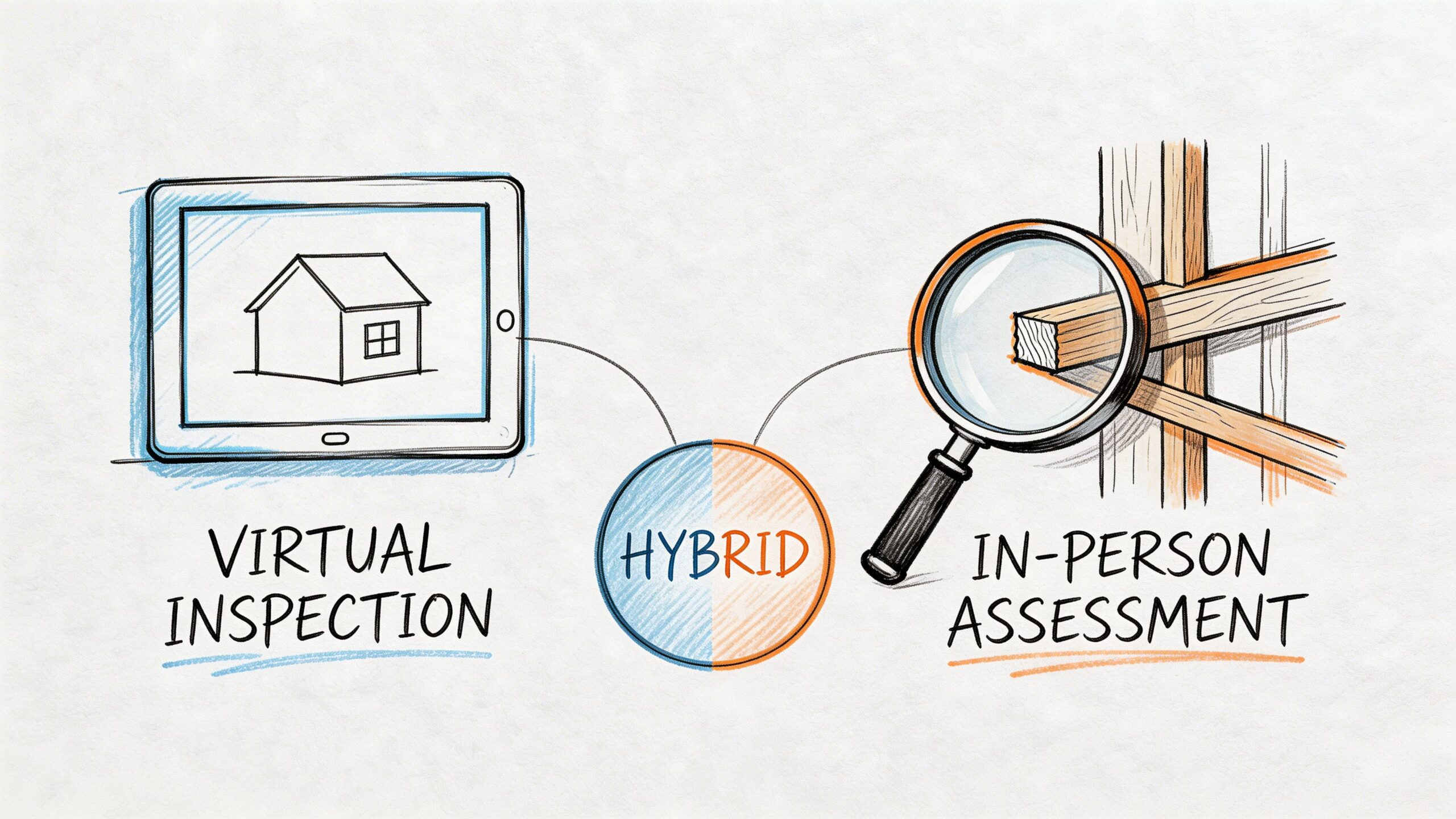
A hybrid inspection combines remote oversight with on-site expertise.
The field professional handles the hazardous, technical, or access-limited part of the job. The desk adjuster or remote expert reviews in real time, asks for targeted captures, and helps shape the documentation while the person on site works safely and methodically.
That model solves several problems at once:
| Problem | Hybrid response |
|---|---|
| Desk adjuster can’t safely access the roof | Field specialist captures the roof data on site |
| Remote images miss critical angles | Live guidance requests exact retakes and closer views |
| Claim needs fast movement | Remote handler can review while the inspection is happening |
| Damage scope is disputed | Both field evidence and remote oversight strengthen the file |
Why it works better on complex losses
Hybrid inspection keeps the speed advantage of virtual work without asking a homeowner to do a specialist’s job.
That matters on storm losses. A trained person on site can identify where to look, how to move safely, and what details will matter later in estimate review or coverage discussion. The remote reviewer can then direct additional documentation while the scene is live, instead of discovering gaps days later and ordering another visit.
This is also where field connectivity becomes a practical issue, not a technical footnote. Live streaming from rural properties or storm-affected neighborhoods often depends on backup connection options. Equipment such as a USB 4G LTE modem for mobile connectivity in the field can be part of a workable remote support setup when site internet is poor or unavailable.
Virtual-only is a tool. Hybrid is a strategy.
When to escalate without hesitation
Some claims should move to hybrid or full field inspection immediately.
Use that path when you see:
- Steep or tall roof geometry
- Evidence of tree impact
- Complex water entry patterns
- Multiple damaged elevations
- Safety concerns around access
- Disagreement over cause or scope
- Commercial-style components on a residential property
- Any file where the first image set raises more questions than it answers
A disciplined claims program doesn’t resist escalation. It expects it.
The strongest remote programs are not the ones that keep everything virtual. They’re the ones that know exactly when to stop pretending remote is enough.
Best Practices for High-Quality Virtual Inspections
Good virtual inspections come from standards, not hope.
If the carrier wants reliable remote results, the process has to be designed around evidence quality, escalation discipline, and review controls. Otherwise the program fills the file with images but still leaves the adjuster guessing.
Set the carrier rules first
Start with internal requirements before assigning a single remote inspection.
Define which claim types qualify for virtual handling, which ones require immediate field escalation, and which ones can begin remotely but may convert to hybrid. Give inspectors and adjusters a clear capture standard so everyone knows what “complete” looks like.
A useful quality framework includes:
- Required views: Street-level address confirmation, full elevations, room overviews, and close-ups of reported damage
- Component checklists: Roof edges, flashings, penetrations, ceilings, flooring transitions, mechanical areas, and detached structures where relevant
- Escalation triggers: Unsafe access, inconsistent visuals, limited cooperation, or suspected hidden damage
- Report standards: Labeled photos, concise observations, and a direct recommendation for next action
Prepare the homeowner like a participant
The policyholder shouldn’t be treated as a passive bystander if they’re the one holding the phone.
Give simple instructions. Charge the device. Turn on lights. Move vehicles if they block elevations. Open gates. Open attic or utility access if safe. Have a flashlight available. If the homeowner knows the sequence ahead of time, the session goes faster and the image set improves.
The tone matters too. People do better when they understand the purpose of the task. Tell them the goal is to document conditions clearly, not to prove or disprove their claim in real time.
Build quality control into the program
Remote evidence should be reviewed with the same seriousness as field evidence.
That means using platforms or workflows that preserve capture integrity and metadata when available, spot-checking reports for missing views, and requiring retakes when the file isn’t defensible. It also means auditing borderline files to see whether remote handling was the right choice or whether the assignment should have escalated sooner.
For more advanced losses, 3D capture can add a meaningful layer of documentation. According to Matterport’s discussion of virtual inspections, advanced virtual inspections using 3D digital twins and photogrammetry can quantify volumetric damage with millimeter precision, reduce the need for ladder assists by up to 90%, and provide tamper-proof evidence for complex claims involving HVAC, electrical systems, and steep roof structures.
That doesn’t mean every homeowner loss needs a digital twin. It means carriers should know when advanced capture is worth deploying.
Use the right tools, not just the nearest tools
Inspection quality improves when the field setup is stable and repeatable.
That can include mounts, lighting, connectivity support, and equipment that helps capture the same type of evidence every time. Even practical accessories such as a secure mounting system used for fixed outdoor cameras and temporary site observation reflect the broader point. Claims documentation gets better when the hardware is chosen on purpose.
A final checklist for reliable virtual home inspections:
- Match the method to the risk
- Use guided workflows for anything more than basic DIY capture
- Escalate quickly on steep roofs and complex storm damage
- Require labeled, reviewable reports
- Adopt advanced capture only where it improves the claim decision
Virtual inspection quality isn’t mostly about software. It’s about whether the people running the process understand what a claim file needs to stand up later.
When a claim involves steep roofs, storm damage, tree impact, ladder assist, or emergency site stabilization, remote review often needs qualified field support to get the file right. Fox Claims Consultants LLC provides nationwide property inspection support focused on high-risk structures, rapid response, clear documentation, and safety-first field work that helps carriers, adjusters, and policyholders move claims forward with confidence.
Leave a Reply